

サイトカスタムの備忘録です。
WordPressの「ギャラリー」に配置された画像をクリックした際に、モーダルウィンドウが開くように設定する方法を紹介します。
JavaScriptとCSSを使用します。
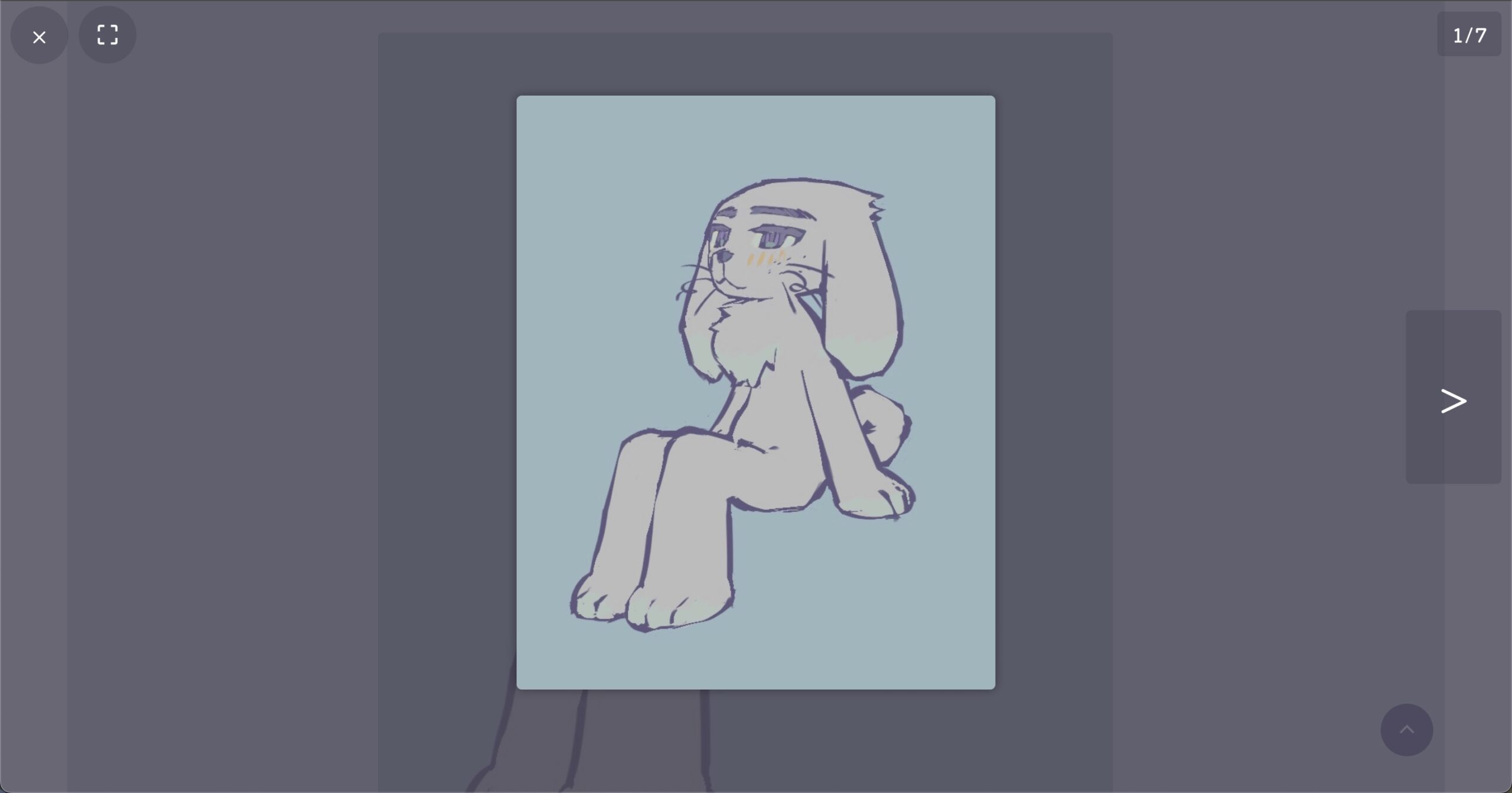
画像移動はスワイプや矢印キーでも反応します。
♡JavaScript
当サイトはWordPressプラグインSimple Custom CSS and JSを使用しています。
カスタムコードの「JSコードの追加」からコードエディタを開き、

下記を記述します。
jQuery(document).ready(function ($) {
// ===== モーダル要素を動的に生成 =====
const modal = $(`
<div class="my-modal">
<button class="close">×</button>
<button class="fullscreen material-symbols-outlined">crop_free</button>
<button class="prev"><</button>
<div class="modal-content">
<img>
<div class="caption"></div>
</div>
<button class="next">></button>
<div class="counter"></div>
</div>
`).appendTo("body");
// ===== 要素の取得 =====
const modalImg = modal.find("img");
const captionEl = modal.find(".caption");
const prevBtn = modal.find(".prev");
const nextBtn = modal.find(".next");
const closeBtn = modal.find(".close");
const fullscreenBtn = modal.find(".fullscreen");
const counterEl = modal.find(".counter");
const fadeControls = modal.find(".close, .fullscreen, .counter, .prev, .next");
// ===== ギャラリー画像リスト =====
const galleryImgs = $(".wp-block-gallery img").toArray();
let currentIndex = 0;
let scrollPosition = 0;
// ===== ナビゲーションボタンの表示更新 =====
function updateButtons() {
if (galleryImgs.length <= 1) {
prevBtn.hide();
nextBtn.hide();
} else {
prevBtn.toggle(currentIndex > 0);
nextBtn.toggle(currentIndex < galleryImgs.length - 1);
}
}
// ===== コントロール類のフェード切替 =====
function toggleControls() {
const anyVisible = fadeControls.filter(":visible").length > 0;
if (anyVisible) fadeControls.fadeOut(300);
else {
updateButtons();
fadeControls.not(".prev,.next").fadeIn(300);
prevBtn.filter(":visible").fadeIn(300);
nextBtn.filter(":visible").fadeIn(300);
}
}
// ===== 画像を表示 =====
function showImage(index) {
currentIndex = index;
const imgEl = $(galleryImgs[currentIndex]);
const src = imgEl.attr("src");
const captionHtml = imgEl.closest("figure").find("figcaption.wp-element-caption").html() || "";
// フェードで画像切替
modalImg.stop(true, true).fadeOut(150, function () {
modalImg.attr("src", src).fadeIn(150);
});
// フルスクリーン時はキャプション非表示
if ($("body").hasClass("is-fullscreen")) captionEl.hide();
else captionEl.html(captionHtml).show();
// カウンター更新
counterEl.text(`${currentIndex + 1} / ${galleryImgs.length}`);
modal.css("display", "flex");
fadeControls.show();
updateButtons();
}
// ===== サムネイルクリックでモーダル表示 =====
$(document).on("click", ".wp-block-gallery figure", function (e) {
// キャプション内リンククリックは無視
if ($(e.target).closest(".wp-element-caption a").length) return;
const img = $(this).find("img").get(0);
if (!img) return;
// 背景スクロール固定
scrollPosition = window.scrollY;
$("body").css("--scrollY", `-${scrollPosition}px`).addClass("modal-open");
currentIndex = galleryImgs.indexOf(img);
showImage(currentIndex);
});
// ===== モーダルを閉じる =====
function closeModal() {
modal.fadeOut(200, function () {
$("body").removeClass("modal-open").css("--scrollY", "0px");
window.scrollTo(0, scrollPosition);
});
}
// ===== ボタン操作 =====
closeBtn.on("click", (e) => {
e.stopPropagation();
closeModal();
});
prevBtn.on("click", (e) => {
e.stopPropagation();
if (currentIndex > 0) showImage(--currentIndex);
});
nextBtn.on("click", (e) => {
e.stopPropagation();
if (currentIndex < galleryImgs.length - 1) showImage(++currentIndex);
});
fullscreenBtn.on("click", (e) => {
e.stopPropagation();
modalImg.get(0).requestFullscreen?.();
});
// ===== モーダル背景クリックでコントロール切替 =====
modal.on("click", function (e) {
if (!$(e.target).closest(".close, .fullscreen, .prev, .next, .caption a").length)
toggleControls();
});
// ===== キーボード操作 =====
$(document).on("keydown", function (e) {
if (!modal.is(":visible")) return;
if (e.key === "ArrowLeft" && currentIndex > 0) prevBtn.click();
if (e.key === "ArrowRight" && currentIndex < galleryImgs.length - 1) nextBtn.click();
if (e.key === "Escape") closeModal();
});
// ===== スワイプ & ダブルタップ処理 =====
let touchStartX = 0, touchStartY = 0;
let isSwipe = false, isInCaption = false;
const swipeThreshold = 80;
let lastTouchEnd = 0;
modal.on("touchstart", function (e) {
if (e.originalEvent.touches.length === 1) {
const touch = e.originalEvent.touches[0];
touchStartX = touch.clientX;
touchStartY = touch.clientY;
isSwipe = true;
isInCaption = $(e.target).closest(".caption").length > 0;
} else isSwipe = false;
});
modal.on("touchmove", function (e) {
if (!isSwipe) return;
const touch = e.originalEvent.touches[0];
const diffX = touch.clientX - touchStartX;
const diffY = touch.clientY - touchStartY;
// 縦スクロール防止(キャプション除外処理あり)
if (Math.abs(diffY) > Math.abs(diffX)) {
const targetCaption = $(e.target).closest(".caption")[0];
if (targetCaption) {
const { scrollTop, scrollHeight, clientHeight } = targetCaption;
if (
(diffY > 0 && scrollTop <= 0) ||
(diffY < 0 && scrollTop + clientHeight >= scrollHeight) ||
scrollHeight <= clientHeight
) e.preventDefault();
} else e.preventDefault();
}
});
modal.on("touchend", function (e) {
const now = Date.now();
if (now - lastTouchEnd <= 300) e.preventDefault(); // ダブルタップ防止
lastTouchEnd = now;
if (!isSwipe || isInCaption) return;
const touch = e.originalEvent.changedTouches[0];
const diffX = touch.clientX - touchStartX;
const diffY = touch.clientY - touchStartY;
// スワイプ方向判定
if (Math.abs(diffX) > Math.abs(diffY) && Math.abs(diffX) > swipeThreshold) {
if (diffX > 0 && currentIndex > 0) prevBtn.click();
else if (diffX < 0 && currentIndex < galleryImgs.length - 1) nextBtn.click();
} else if (Math.abs(diffY) > swipeThreshold) {
closeModal();
}
});
// ===== フルスクリーン切替監視 =====
$(document).on("fullscreenchange", function () {
const isFull = !!document.fullscreenElement;
$("body").toggleClass("is-fullscreen", isFull);
if (isFull) captionEl.hide();
else {
const imgEl = $(galleryImgs[currentIndex]);
const captionHtml = imgEl.closest("figure").find("figcaption.wp-element-caption").html() || "";
captionEl.html(captionHtml).show();
}
});
});
♡CSS
続いて、CSSで見た目やアイコンの位置などを整えます。
背景色等は自由に変更して下さい。
「タッチや選択の無効化」は必要なければ記述する必要はありません。
/* ==================== モーダル全体 ==================== */
.my-modal {
  display: none; /* 初期非表示 */
  position: fixed;
  z-index: 99999;
  left: 0;
  top: 0;
  width: 100%;
  height: 100dvh;
  background: rgba(69, 65, 82, 0.8); /* 半透明の背景 */
  justify-content: center;
  align-items: center;

  /* タッチや選択の無効化 */
  -webkit-user-select: none;
  -moz-user-select: none;
  -ms-user-select: none;
  user-select: none;
}

.my-modal .modal-content {
  display: flex;
  flex-direction: column;
  align-items: center;
  text-align: center;
  padding: 10px; /* 画像周りの影用余白 */
}

/* ===== モーダル内の画像 ===== */
.my-modal img {
  max-height: 75vh;
  max-width: 80vw;
  pointer-events: none; /* クリック無効 */
  box-shadow: 0 0 10px rgba(0,0,0,0.4);
}

/* タブレット以下画像サイズ調整 */
@media (max-width: 767px) {
  .my-modal img { max-width: 90vw; }
}

/* スマホ用 */
@media (max-width: 500px) {
  .my-modal img {
    max-height: 65vh;
    max-width: 90vw;
  }
}

/* ===== モーダル内キャプション ===== */
.my-modal .caption {
  color: #fff;
  font-size: 14px;
  line-height: 1.5;
  white-space: normal; /* 自動改行 */
  word-wrap: break-word;
  overflow-wrap: break-word;
  max-width: 80vw;
  max-height: 10vh; /* キャプション部分を10%に制限 */
  overflow-y: auto;
  margin: 0.1em auto 0.5em auto;
}

/* スマホ用キャプション調整 */
@media (max-width: 350px) {
  .my-modal .caption {
    max-width: 90vw;
    max-height: 15vh;
  }
}

/* ===== モーダル表示時に背景固定 ===== */
body.modal-open {
  overflow: hidden;
  position: fixed;
  width: 100%;
  top: var(--scrollY, 0px);
}

/* ===== 左右ボタン共通 ===== */
.my-modal button.prev,
.my-modal button.next {
  position: absolute;
  top: 50%;
  transform: translateY(-50%);
  background: rgba(69, 65, 82, 0.4);
  border: none;
  color: #fff;
  font-size: 3rem;
  padding: 3rem 2rem;
  border-radius: 5px;
}

/* タブレット以下ボタンサイズ調整 */
@media (max-width: 767px) {
  .my-modal button.prev,
  .my-modal button.next {
    top: 91%;
    font-size: 2rem;
    padding: 0.5em 1em;
  }
}

/* 左右ボタン位置 */
.my-modal button.prev { left: 10px; }
.my-modal button.next { right: 10px; }

/* ===== カウンター(右上) ===== */
.my-modal .counter {
  position: absolute;
  top: 10px;
  right: 10px;
  color: #fff;
  font-size: 18px;
  background: rgba(69, 65, 82,0.4);
  padding: 5px 15px;
  border-radius: 5px;
}

/* ===== 左上ボタン ===== */
.my-modal button.close,
.my-modal button.fullscreen {
  position: absolute;
  top: 5px;
  width: 55px;
  height: 55px;
  border-radius: 50%;
  background: rgba(69, 65, 82,0.4);
  color: #fff;
  font-size: 25px;
  border: none;
}

.my-modal button.close { left: 10px; }
.my-modal button.fullscreen { top: 7px; left: 75px; }

/* ホバー時の明るさ */
.my-modal button.prev:hover,
.my-modal button.next:hover,
.my-modal button.close:hover,
.my-modal button.fullscreen:hover {
  background: rgba(255,255,255,0.1);
}

/* ==================== ギャラリー全体 ==================== */
body:not(.category-diary) .wp-block-gallery.columns-default,
body:not(.category-diary) .wp-block-gallery.columns-1 {
  max-width: 700px;
  margin: 0 auto;
}

/* キャプションの下マージン調整 */
.wp-block-gallery.has-nested-images figcaption { margin-top:-1em; }

/* ホバー時ポインター */
.wp-block-gallery.has-nested-images.is-cropped figure.wp-block-image {
  cursor: pointer;
  -webkit-tap-highlight-color: transparent;
}

/* タップ時の青ハイライト無効化 */
.wp-block-gallery img,
.wp-block-gallery figcaption,
.my-modal button,
.my-modal img {
  -webkit-tap-highlight-color: transparent;
}

/* ギャラリーキャプション */
.wp-block-gallery.has-nested-images figure.wp-block-image:has(figcaption)::before {
  display: none; /* ぼかし削除 */
}
.wp-block-gallery.has-nested-images figure.wp-block-image figcaption {
  background: linear-gradient(0deg, rgba(158, 168, 173,0.6), rgba(116, 110, 133,0));
  border-radius: 0 0 5px 5px;
  font-size: 15px;
  line-height: 1.5;
  max-height: 50%; /* 画像の半分まで表示 */
  text-shadow: 0 0 6px #808080;
}

/* キャプション改行設定 */
.wp-element-caption {
  white-space: normal;
  word-wrap: break-word;
  overflow-wrap: break-word;
}

/* タブレット以下キャプションサイズ調整 */
@media (max-width: 767px) {
  .wp-block-gallery.has-nested-images figure.wp-block-image figcaption {
    font-size: 13px;
  }
}

/* 画像下マージン調整(クリック領域) */
.wp-block-gallery img { margin: 0; }
.wp-block-image { margin-bottom:1.5em !important; }
記述するコードは以上です。
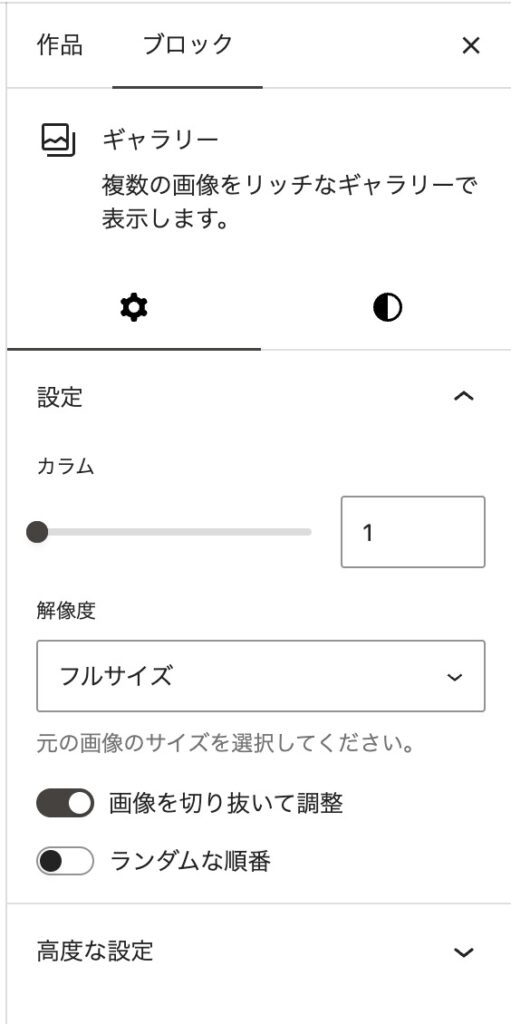
カラム数の調整などは記事作成時にギャラリーブロックの設定から行ってください。